




# Tsugumi
**Run the analysis you sketched with AI, as it is, and check it with your own hands.**
Tsugumi is a research workbench in which the specification a person draws, the thing an AI edits and the processing that actually runs are one and the same Workflow. It runs on macOS, Linux and Windows (Windows through WSL2).
You draw a computation or a data pipeline as Cards and the wires between them, implement it together with an AI, and run it in environments pinned with Nix.
You open the code or the result of a Card you are curious about, change a condition and try again with the inputs that were saved. Going back and forth like this, a researcher comes to understand how the analysis got where it did, and can ask the next question.
Demo video ·
The problem ·
On screen ·
Install ·
First steps ·
Demos ·
Documentation
|
Why it was made ·
The name ·
Read it with moving figures

▶ Watch the demo video (YouTube, in Japanese)
- **The diagram you draw is what runs.** Wire up Drafts and the Agent writes the code, the types and the Nix environment; that Workflow is what gets executed.
- **Try just the Card you are curious about, right away.** Run again only the Cards or child Workflows you choose, with the inputs that were saved.
- **Pinned down to the environment, so it can be checked again.** Each Card's dependencies are pinned with Nix, and every run is recorded against a git version.
- **Computation runs isolated.** In a VM of its own on a Mac, under bubblewrap on Linux. Cards have no outside network by default, and a save in which the Agent widens a Card's permissions does not go through without the user's approval. What is sent to the model is [stated](pages/security.md#what-is-sent-to-the-model). Opening a project is a decision to trust its contents; Tsugumi takes responsibility for what happens inside that ([what it guarantees](pages/security.md#what-tsugumi-takes-on)).
- **A finished Workflow needs no LLM.** The generated code stays as ordinary files that a person can read and fix at any time.
- **Each Claude feature for what it is good at.** Tool use to implement Cards, subagents to implement independent Drafts at the same time, a Skill for the demo guide, multimodal input for the figures a run makes, and MCP (the Claude Code plugin) for agents outside. Small models write the guide and the summaries ([the list](pages/features.md#choosing-claudes-features-by-purpose)).
## Are you using AI in your research as much as you could?
AI has begun to take on long-standing problems in mathematics and science.
Between August and September 2026, OpenAI announced [solutions to, or major progress on, ten open problems](https://openai.com/index/ten-advances-in-mathematics/), and Anthropic's Claude announced [an improved lower bound on the Riemann zeta function](https://www.anthropic.com/research/riemann-zeta) and [a complete formalisation of Fermat's Last Theorem](https://www.anthropic.com/research/formalizing-fermats-last-theorem). Each formalised its argument in a proof assistant such as Lean and published proofs a computer can [check mechanically](https://lean-lang.org/doc/reference/latest/ValidatingProofs/).
In October, the physicist Matthew Schwartz and Anthropic ran Claude inside a computational harness that could be checked rigorously, and in a few weeks it computed 15 Feynman integrals of particle physics that had never been computed before ([Claude-shaped science](https://www.anthropic.com/news/claude-shaped-science)).
People can weigh these results, understand what they mean and ask the next question because the AI's arguments and computations can be checked by an independent mechanism.
**To hand work to an AI, you need a way to check that work.**
Why, then, do we hesitate to hand more of our everyday research to AI?
1. **Reproducibility is not assured.** The code, the inputs and the environment behind a result are not kept together, so the same computation cannot be checked again.
2. **The path to the conclusion is invisible.** You cannot follow which data was processed how, or where which decision was made.
3. **Handing data to an AI is frightening.** You cannot tell where unpublished data is sent or how it is handled.
What these share is that **there is no foothold from which a person can follow, afterwards, what the AI did and what it handled.**
## Every check raises the next question
With AI, the time from writing code to running experiments to summarising results has shrunk dramatically.
What was tried and what was learned arrives at once, as a tidy summary or report.
But the faster and larger the trial and error becomes, the harder it is to hold a report written in words up against the processing that actually happened.
"What would change if I altered just this condition?"
"I'd like to try a different approach just here."
Each time, you ask for another attempt and read through the long report that comes back.
You search thousands of lines of code and explanation for an assumption that quietly changed, and recheck what the conclusion rests on.
The experiments themselves run fast, but you come to a halt at the stage where a person has to digest the process and turn it into the next idea.
**Weighing results, deciding what to accept as evidence and choosing what to ask next is the researcher's own work.**
Checking is also a creative place where new ideas are born.
Would the same trend appear with a different way of estimating the background? Would another model explain the difference that could not be explained?
Each time you change a condition and compare results, you see how far a hypothesis holds, and something new to look into appears.
In Tsugumi you can put your hands directly on the place where the question arose.
Read a Card's code, change a parameter and try it with the saved inputs. Go back to an earlier approach in the version history and start a different one.
Tune things with partial runs, and finally run the whole Workflow to confirm the result.
**From understanding how an analysis went to trying your own question: I want to make that distance short.**
By keeping the trial and error done with AI in a structure you can see across, Tsugumi gives researchers time to think hard about hypotheses and results, and room to move on to the next attempt.
## What we want to ask of AI should be simple
Download the observation, split it by energy, plot it.
What you want is simple enough to get across by drawing three boxes on paper.
Yet today we write long instructions, read long reports, and check again whether we were understood.
## Draw the shape of the processing. Implement it with AI. Run it and check.
Tsugumi is a **macOS app for assembling computation and data processing as a graph of Cards (a Workflow)**.
1. **Draw.** Place Drafts, which have only a name and a description, and wire them up to design the whole flow.
2. **Implement.** Leave a Draft to the Agent, or write C++ / Python / bash / R / Julia yourself. The generated code stays in the project as ordinary files that you can reread and edit at any time.
3. **Check.** Run the graph in environments pinned with Nix, and look at each Card's progress, outputs and logs. When you fix a step in the middle, run again from there at once, with the saved inputs.
## Splitting the processing finely, without making trial and error heavy
The more finely you split processing into pieces you can work on, the more effort goes into types and environments, and the more time goes into starting and recording. Tsugumi takes this on with the Agent and its runtime. From a Draft, the Agent writes the code, the output types and the Nix environment; changing a condition does not trigger a rebuild; a partial run reruns only the Cards you chose, with saved inputs; and a run is reported as finished only after its record is saved.
**The structure a person draws, the structure the Agent implements and the structure that runs are the same.**
The generated code stays as ordinary files, and a finished Workflow runs without an LLM. Why these measures were taken, and where their code and tests are, is in [Measures that keep trial and error light](pages/rationale.md#measures-that-keep-trial-and-error-light).
## Following an experiment on screen
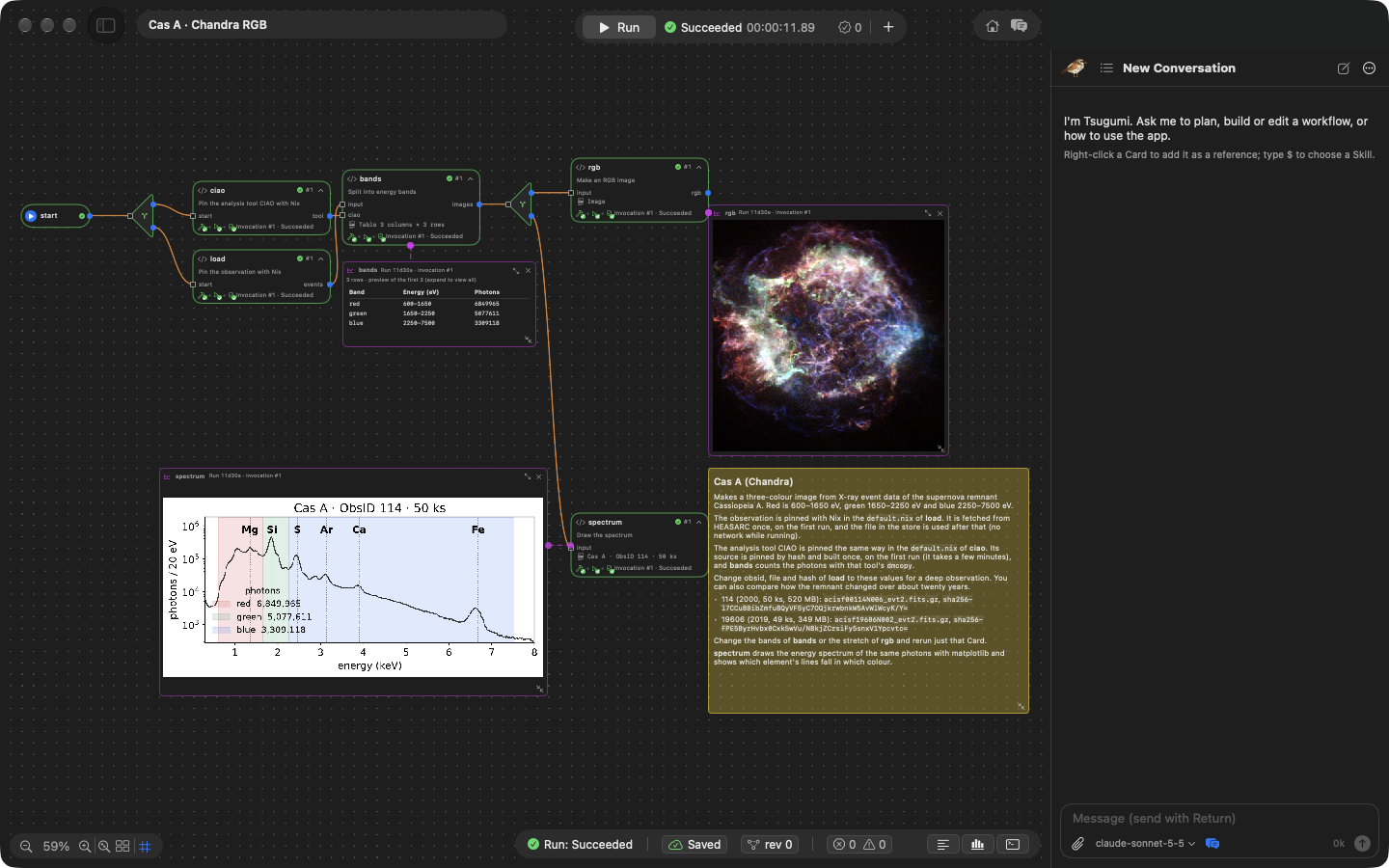
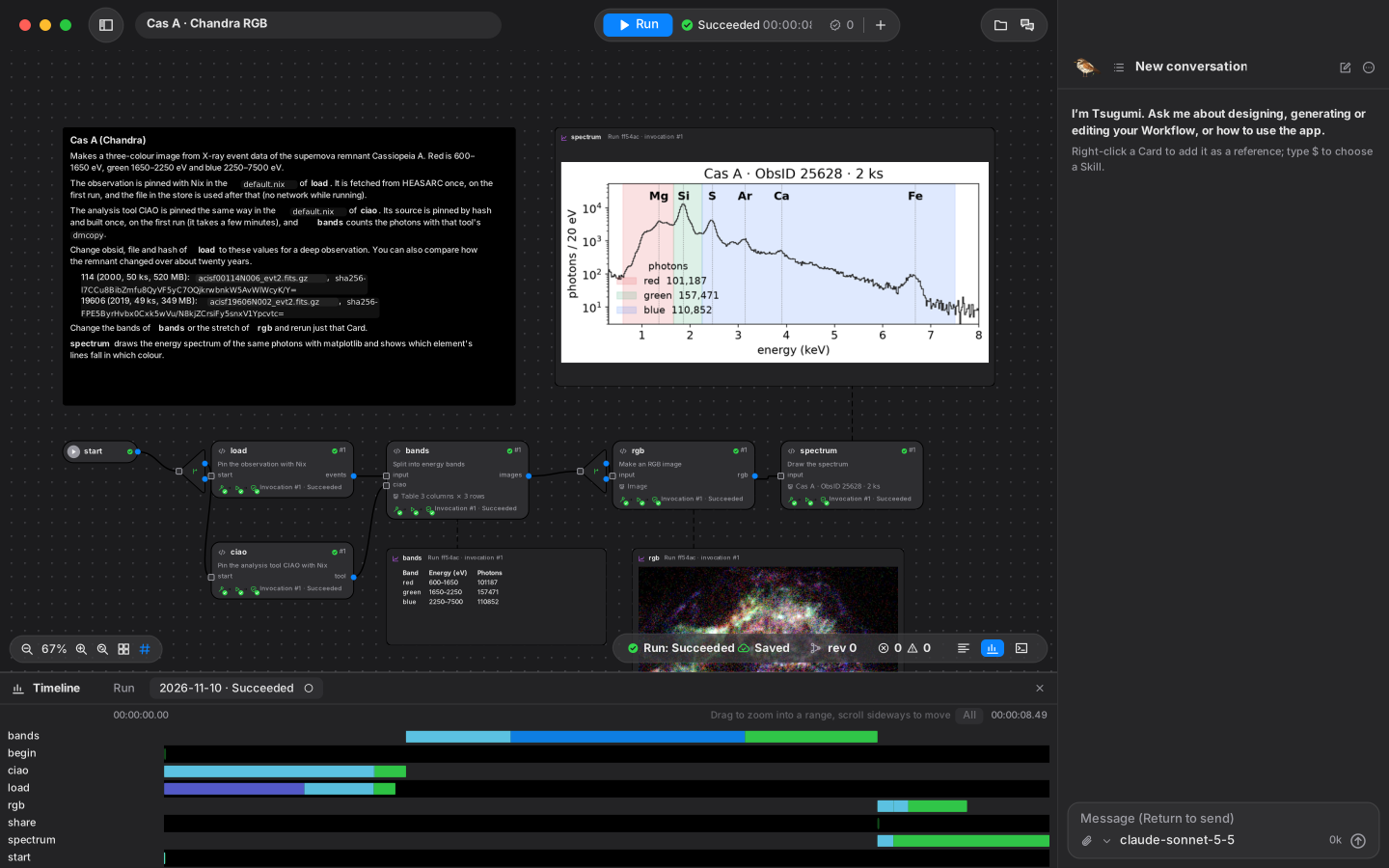
The bundled "Cas A · Chandra RGB" demo fetches an X-ray observation (Chandra) of the supernova remnant Cassiopeia A, pinned with Nix, and splits its photons into three energy bands to make an RGB image.
It also draws the energy spectrum of the same photons with matplotlib, so you can see which element's emission lines became which colour.
Switch to the deep observation ObsID 114 (50 ks, about 15 million photons in the three bands) and the lines in the spectrum stand out more clearly.
### Seeing the whole flow
In the screen at the top of this page, a sticky note states the aim of the analysis, and below it runs the flow `load` → `bands` → `rgb` / `spectrum`.
When it runs, each Card shows its progress, and the table of photon counts per band, the RGB image and the spectrum appear right on the Canvas.
The spectrum shows that the green band (1.65–2.25 keV) contains exactly the Si line, while S, Ar, Ca and Fe fall in blue. What the colours of the image mean can be checked on the same screen.
From the chat on the right you can ask the Agent to implement or change things.
### Reading the code and trying other conditions
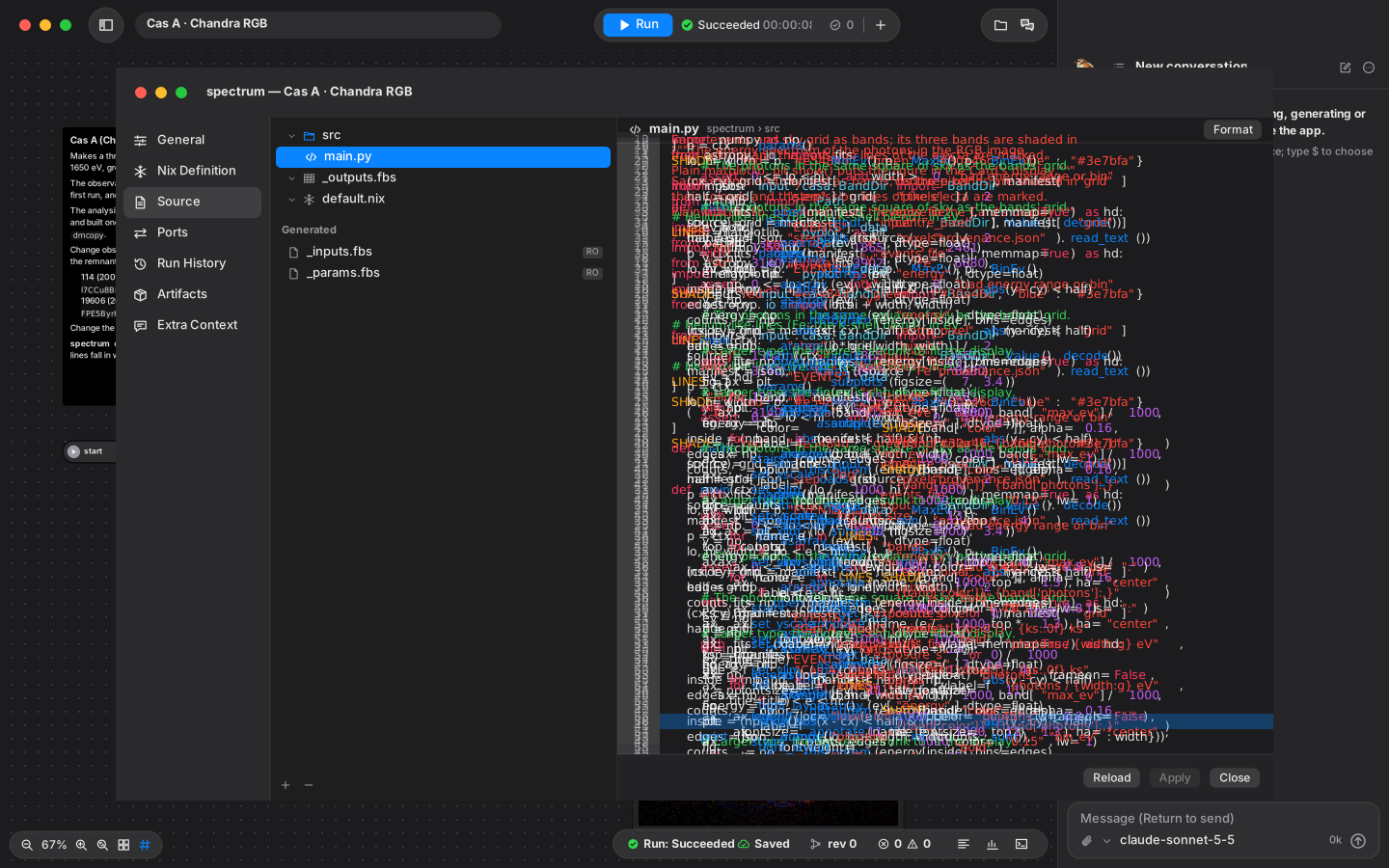
Open a Card's settings to see its source code, its input and output ports, and the definition of its environment (`default.nix`).
`spectrum` draws with Matplotlib and publishes the figure through `report.figure()`.
Rewrite the band edges or the bin width of the spectrum and rerun only that Card with the saved inputs, and checking continues from the very place you were curious about.
 ### Looking back at what actually ran
The timeline at the bottom of the screen shows when each Card ran and for how long.
You can also open each Card's run history, logs and artifacts, and check every step on the way to the conclusion.
 ### Going inside a step
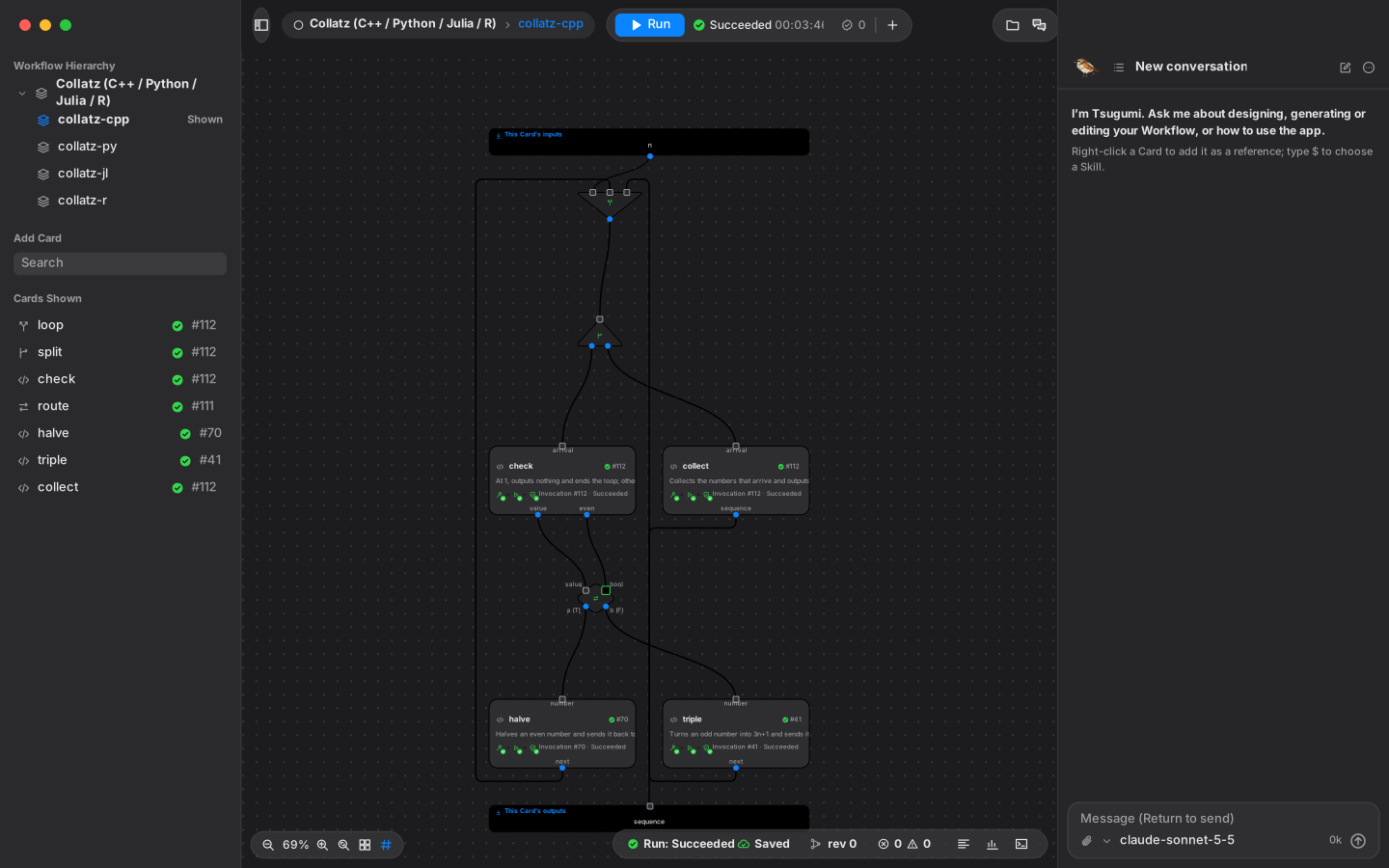
A large step can be gathered into a child Workflow (a Card in a Card). Open "collatz-cpp" in the "Collatz (C++ / Python / Julia / R)" demo and the Workflow inside it appears, with a branch and a loop.
Most of the time you handle it as a single Card; when you want to check, you can go down to its finest steps.
 ### Letting Tsugumi the thrush show you around
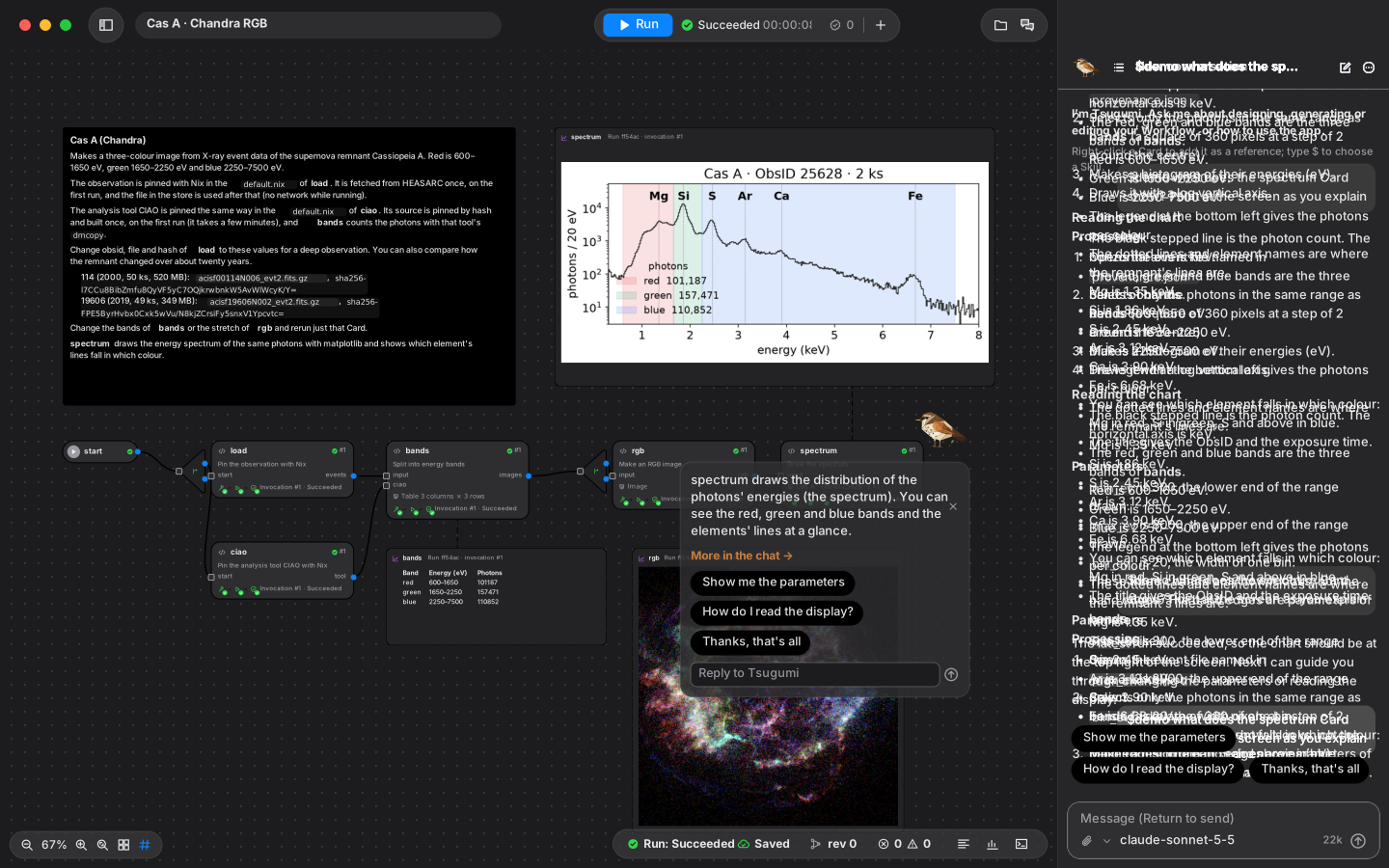
The first time you open the app, the thrush in the bottom right asks "What would you like to do?". Choose between watching a demo run and having the AI implement Drafts, pick a field, and it takes you to a demo.
In a project, the chat is the thrush. Write `$demo` and it flies around the screen, pointing at Cards, the Run button and a Card's settings, and explains one step at a time with choices to pick from (with an OpenAI or Anthropic API key, or a ChatGPT plan; without a key, three demos have a fixed script).
 ## Trying it
### Install
Use the [installation guide](pages/install.md) for the macOS app or the `tsugumi` command on Mac, Linux and Windows.
### First steps
1. **Open a demo.** From "Browse Demos" on the home screen, choose "Open a Copy" on the demo you want. An editable copy is made for you; the bundled original is left unchanged.
2. **Run it.** Once the first preparation is done, press "Run" at the top of the screen. Open a Card, change its code or its conditions, and rerun just that Card.
3. **Let the thrush guide you.** Send `$demo` in the chat and the thrush points at the screen and guides you step by step. Without an API key, three demos (Data to report, Kepler-6 b and Pharmacokinetics) have a fixed script.
4. **Connect the Agent (optional).** Register an Anthropic or OpenAI API key under "API" in the settings, or sign in with "Continue with ChatGPT", and the Agent can make Cards, and the thrush answers questions in any demo. The Agent is sent the conversation and what its tools read, such as sources and logs ([what is sent to the model](pages/security.md#what-is-sent-to-the-model)). Without the Agent, everything (making, editing and running Cards) can still be done on screen.
The app and the Web UI are in Japanese by default; choose English under "General" in the settings.
If you use Claude Code, the `tsugumi` plugin lets Claude Code work on a project in the Web UI ([Using it from Claude Code](pages/claude-code.md)).
### Bundled demos
Open an editable copy in the app, or inspect recorded runs in the [web gallery](https://gen740.github.io/Tsugumi/#demos). The [demo guide](pages/demos.md) explains what to try and how to interpret each result, including Drafts for the Agent to implement.
## The flow of processing as a common language for people and AI
"What I want done", "what was run" and "what to change next".
Tsugumi shares all three on the same Workflow. From getting an intention across to weighing the result and asking the next question, the work moves forward on one structure.
This idea starts from research and extends to turning research decisions into teaching material you can run, to understanding and growing the tools you made with AI, and to handing work to the next person in a form they can run and check ([Vision and applications](pages/vision.md)).
**The more work we hand to AI, the more we need an environment in which people understand the process and make the next decision.**
## Documentation
[User guides](pages/documents.md) · [Repository map](https://github.com/gen740/Tsugumi/blob/main/AGENTS.md#map) · [Tests](https://github.com/gen740/Tsugumi/blob/main/tests/README.md) · [Releasing](https://github.com/gen740/Tsugumi/blob/main/RELEASING.md) · [Documentation site](https://github.com/gen740/Tsugumi/blob/main/docs/site/README.md)
## License
Tsugumi's own code is under the MIT License ([LICENSE](https://github.com/gen740/Tsugumi/blob/main/LICENSE)). External code, fonts and data are under their own licenses, whose full texts ship with the app and the `tsugumi` command. The list of dependencies is in [THIRD_PARTY_NOTICES.md](pages/third-party-notices.md); what the distributions include and how the VM's corresponding source is provided are in the [Licenses and distribution](pages/licenseaudit.md).